
Some people are happy with low volume , while others need their eardrums to hurt to enjoy music . Your Android phone lets you turn up the volume to a certain point, and beyond that, it warns you to be careful because you could damage your hearing. If you continue, you do so at your own risk, but you'll soon reach the limit again. However, there are apps that allow you to turn up the volume even more, even beyond the device's limit . Here's how you can do it.
There are two key components to a mobile phone's sound system : hardware and software . The hardware includes the DAC ( Digital-to-Analog Converter) and the speakers or headphones, which obviously limit the quality and maximum volume. But there's also software that handles audio control, and this is where users can modify the settings to increase the volume beyond the factory limits. Furthermore, root access isn't required ; a simple application is all that's needed to perform all the necessary functions.

How to increase the volume of your Android mobile beyond the limit allowed by the system
Once you install the Volume Booster app, the feature will activate, and a floating window with a slider will appear at the bottom of the screen . This slider allows you to increase the volume by percentage, independently of the device's media volume control. However, this modification only works with apps; that is, you can use it with Spotify or YouTube, for example, among many others, but you won't be able to increase the volume during phone calls.
Within the app, tapping the gear icon will take you to Settings . Here you can adjust, for example, the maximum amplification allowed up to a certain level. It's advisable to set a relatively low limit, both to minimize distortion and to protect your hearing and the headphones or speakers themselves. The loss of sound quality becomes increasingly noticeable as you increase the level.
In the settings, there's another option, "non-uniform amplifier ," which only works on versions prior to Android 4.4. With it, you can control whether all frequencies are amplified, or specifically the bass and treble frequencies. Besides amplifying the audio level, it also acts as a frequency filter.


Another alternative to increase the volume
But there are other ways to boost the volume beyond what your system allows. The GOODEV volume booster app is one of the most popular , boasting over 10 million downloads. While its interface isn't as polished as some other options, it offers some useful features.
For example, from its options you can choose whether you want it to activate when you restart the device, as well as set the maximum amplification you want to use , to avoid getting too excited and destroying your mobile's speakers, or your eardrums.
How to improve the volume if we use headphones
Mobile phones are increasingly used to listen to videos or music anywhere and at any time of day, especially when traveling or walking down the street. For these situations, we usually use headphones to listen to music comfortably without disturbing anyone. Even so, the sound quality can be improved, which is why we have apps like Wavelet.
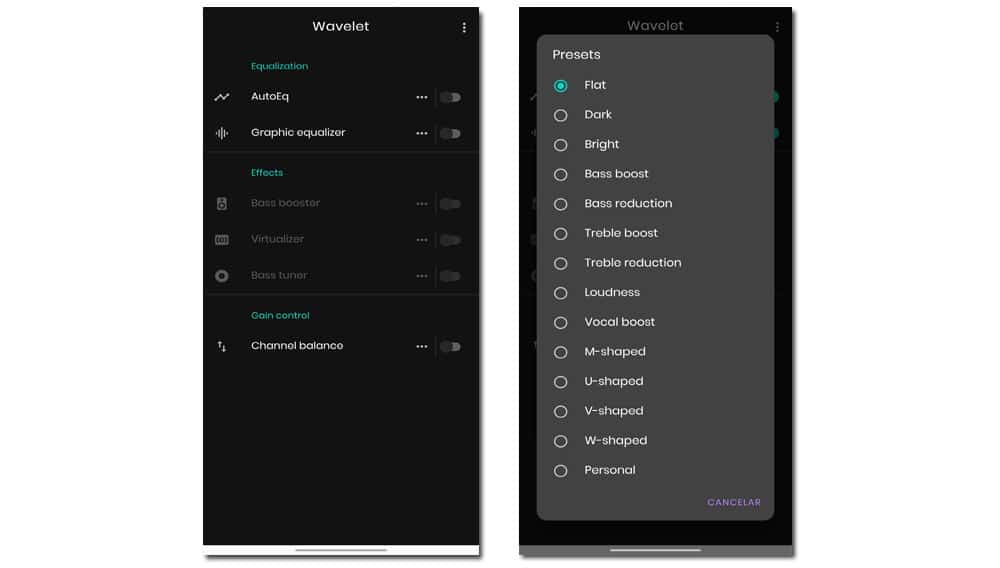
It's an app that enhances the sound of your device when playing content, specifically when using headphones . Essentially, it functions as an equalizer, which you can also adjust to your listening preferences. Its potential is realized when audio is playing, such as on Spotify, YouTube, or any other platform that plays multimedia content. This app works in the background , automatically detecting the audio without requiring any adjustments within the app itself.

Table of Contents